Speech
Speech would be an obvious choice. Speech is already a feature on the iWatch so it's easily available and takes up no space as speech isn't physical, only the words that are produced by the speech. It will minimalise the space used, making speech a great choice. However, as I've discussed within the other research post. Speech is problematic for many people as they feel silly speaking to their watch in public.
Braille
What Is Braille?
"Braille is a system of raised dots that can be read with the fingers by people who are blind or who have low vision. Teachers, parents, and others who are not visually impaired ordinarily read braille with their eyes. Braille is not a language. Rather, it is a code by which many languages—such as English, Spanish, Arabic, Chinese, and dozens of others—may be written and read. Braille is used by thousands of people all over the world in their native languages and provides a means of literacy for all."
"Braille is a system of raised dots that can be read with the fingers by people who are blind or who have low vision. Teachers, parents, and others who are not visually impaired ordinarily read braille with their eyes. Braille is not a language. Rather, it is a code by which many languages—such as English, Spanish, Arabic, Chinese, and dozens of others—may be written and read. Braille is used by thousands of people all over the world in their native languages and provides a means of literacy for all."
Braille came to my head as it is another way of communication. Braille isn't spoken it's felt and that can be very promising as another way to communicate words on the iWatch. The alphabet of Braille is within a grid of 3 x 3 which is a perfect size to fit on the iWatch screen. Maybe the user could use braille to communicate? Instead of feeling braille the user would swipe their finger to make the braille pattern on the 3x3 grid to spell out words. Could be an interesting avenue to test.
Samsung's Unlock Pattern
To continue the pattern/grid theme, Samsung also incorporates a pattern grid in order for the user to unlock their smartphone. The grid is the same size as the braille alphabet; a 3x3 grid allows the user to make a number of complex patterns to ensure their device is safe from anyone trying to unlock their phone. If the grid was 2x2 the easier it would be for people the get into someone else's phone as the number of potential combinations dramatically drops. Another potential idea could write the words in the grid. Instead of following the braille alphabet the user could just write 'A' using the grid. The grid would be big enough to accommodate all letters. This will remove the process of learning braille.


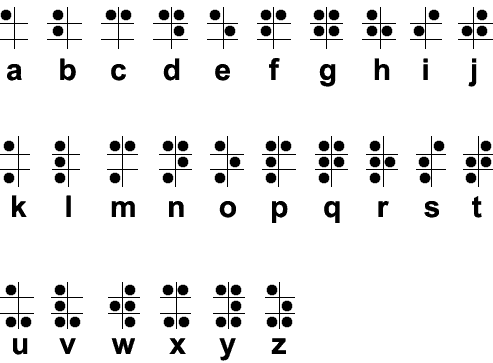 |
| Braille Alphabet |
Samsung's Unlock Pattern
To continue the pattern/grid theme, Samsung also incorporates a pattern grid in order for the user to unlock their smartphone. The grid is the same size as the braille alphabet; a 3x3 grid allows the user to make a number of complex patterns to ensure their device is safe from anyone trying to unlock their phone. If the grid was 2x2 the easier it would be for people the get into someone else's phone as the number of potential combinations dramatically drops. Another potential idea could write the words in the grid. Instead of following the braille alphabet the user could just write 'A' using the grid. The grid would be big enough to accommodate all letters. This will remove the process of learning braille.


Finger Writing
Many brands such as Snapchat and Facebook Messenger incorporate the ability for the users to communicate with their fingers. This idea was first to introduce by Snapchat where the user can take a picture and draw on top of it using their finger (example below). This idea of using your finger to draw and write is not only creative but efficient and practical for the majority of users. In terms of ease, this method would be the easiest to introduce. The user knows how to write with a pen or pencil so writing with their fingers would be an effortless transition. Applying this method onto the iWatches small screen will also be achievable. When we write on paper the words are already very small, around 12pt. The screen will be bigger enough for users to write naturally. The only downside is the user would only be able to write 1 or 2 letter at a time.

Whatever solution is selected we must ensure other options are also available for everyone. This ensures the app become access for all user with disabilities.

No comments:
Post a Comment