Friday, 28 April 2017

EP // BRIEF 7 // SPOT METERING WEBSITE // WEBSITE GRID SET-UP

The grid idea for Spotmetering.com consists of a dynamic circular grid system. Each page of the site is presented on a rectangular slider which rotates within a circle coming in and out of the site when called by the users. There is a demo below which demonstrate this concept in case whoever is reading this is confused. The idea around the rotating structure is to increase a viewing experience which i simplistic and effortless, to discard all unnecessary content and only present content that is important for the users overall experience allowing more concentration to push the selling of the book. As you can see from the video, the style of the grid portrays a contemporary and minimal aesthetics which raises the visual appeal. In regards to user experience, the journey is simply effortless, the user never leaves the homepage and all content is accessible horizontally avoiding any content being below the fold.

This grid can be easily translated within a responsive layout (see image below). The desktop and mobile sites are very similar, making the overall site consistent with maximum visibility by users.


BW-MOCKUP-FUNCTIONALITY-1 from Jack Solomon on Vimeo.


Saturday, 15 April 2017

EP // BRIEF 6 // HUNGRY HOUSE // 3X3 GRID CHANGE FEEDBACK

At the moment I've been using a 3x3 grid as a theme throughout the app. It also lays the foundation for how the content is structured. However, I began to show the mockups with other people. I didn't have an iWatch so I had to show the mockups at actual size on my screen. From this point, it was immediately clear people were struggling to understand the text size or icons. When I asked for feedback I demonstrated how a user would swipe with their fingers to make a pattern. When I did, my fingers were bigger than the individual grid square. This was a problem, the grid needed to be big enough for the user to comfortably tap the grid without having any issues. Everyone agreed that the grid was too small especially if I was going to have the exact layout on the 38mm. It would be impossible to use the current mockups on a 38mm if there is already a clear size struggle on the 42mm.

In response to the feedback, I changed the grid to a 2x2. This instantly doubles the sizes of all elements on the UI, from the Icons to the text size. The only downside this may cause is the combinations of patterns. With a 3x3 grid the number of potential pattern combinations are endless, with a 2x2 the number dramatically decreases... but how many people are going to be saving more than 20 orders to a pattern. I don't think this change would greatly damage the overall experience.


EP // BRIEF 6 // HUNGRY HOUSE // MOCKUPS

Below are the first set of mockups for the Hungry House app. The screen size I've designed for, for these particular mockups is the 42mm. This gives me more space to work with but the objective eventually is to ensure the app can run on the 38mm also. I made sure to follow the brand guidelines of Hungry House, ensure a consistent link and approach to their desktop and mobile site. On their other sites, they use a lot of visual imagery to show off the food and they also use white as their main colour. However, for the iWatch, visual images would be counterproductive. There isn't enough room for them on the iWatch, they would take up a great deal of space making the user experience suffer. More imagery means the user would have to actually swipe away or scroll past the images to get to what they actually want. Red has been used as the primary colour for the iWatch, this is replacing the images. There needs to be an element of engagement and excitement, which you would get from images but with no images on the iWatch, the red is used to portray these feelings. Using white as the primary colour would make the UI visually dull and boring.

Below are the different stages of the app:

Grid

This is what the grid would look like. It's a 3x3 grid allowing enough space for user's fingers. This grid would only appear empty when the user is ready to enter their pre-saved pattern to quickly and efficiently order food. The image on the right is a representation of what it would look like once the user has entered their pattern. A simple pattern and in response their food order name appears at the bottom.


Search

It's not been decided yet but the user can search how they would normally on the iWatch (image below) or they can use the 3x3 grid to also spell out letters.


Filter concept

The filtering steps will ensure the user can get from A - B as quickly as possible. To remove the unwanting content, filters, and setting and just provide the user with the essentials. The user must be made aware that if they're after an experience where they are in control then the iWatch app isn't for them. They can sync their progress to their iPhone if they want specific settings. It's a light version only providing three steps. These three steps being countries, cuisine, and restaurants. Below you can see all three steps. Sticking with a consistent theme throughout the 3x3 grid is used to arrange the content. This guarantees the user can use the pattern motion to choose their food. Again, consistent and familiar. Icons are used to save room and implement a sense of visual appeal as no actual images are used.


I also experimented with a few optional colors and styles. By asking and receiving feedback I was able to make the right choose. Black was an effective colour but in regards of representing food, it isn't the best option. It could be used as a high contrast version for visually impaired users but black isn't an appetising colour, plus the black and green aren't associated with the Hungry House brand. 


EP // BRIEF 6 // HUNGRY HOUSE // PATTERN IDEAS

Below are visualizations of the pattern, grid idea for Hungry House. What I was attempting with the sketches was to show all letters and shapes combinations the grid could make. If the grid could make the whole alphabet then this method of communication could be successful. Even if the iWatch already has the ability to type using swipe motions the grid-based method allows add an accessible feature to the app. This allows users who may not have full control of their fingers or hands to be able to use the grid. 

The other part of the sketch was briefly seeing how the grid could be used within other areas of the app. Such as having food within the grid pattern which the user can swipe to efficiently select the food they want. This idea could be interesting, the grid theme could be a consistent element throughout the whole app. The user being able to filter through a content in this way would be more visual by using icons. It would also be a great way to organise content within such a small screen size, by using icons we avoid using as much text; this opens up space, making the layout more minimal.


EP // BRIEF 6 // HUNGRY HOUSE // NARRATIVE IDEAS

The two brands that I've moved forward with are Hungry House and Uber. In order to understand if the brands and its users would benefit from the iWatch, potential scenarios were written down.

Scenarios for Hungry House were:

  • The user could potentially be drunk and wants to quickly orders his favorite food instantly without going through the normal process.
  • The user is in a rush home due to being stuck in meetings and needs to order dinner. Instead of cooking dinner the user can use the iWatch to quickly order food.
  • The user cannot cook and isn't close to any takeaways, the iWatch become beneficent and the best option to order food. 
Scenarios for Uber are within the image below. But shortly after doing this I found out that Uber already have an app on the iWatch so progressing with Uber would be pointless.


EP // BRIEF 6 // HUNGRY HOUSE // WHICH BRAND TO USE


Friday, 14 April 2017

EP // BRIEF 6 // HUNGRY HOUSE // IWATCH INTERACTIVE FEATURES

Before even starting with research or ideas generation I created a spider diagram to understand what the iWatch can bring to the table in regards to interaction. What are the benefits of the iWatch in comparison to a regular watch or even a smartphone? Can any of this feature be used with existing brands? Could they tap into a unique audience? Audiences who look at their watch while running, swimming, or playing sports? Below is the spider diagram:

What Interactive features does the iWatch possess?

  • Water Resistant
  • Organic positioning 
  • Compatible with iPhone
  • Swipe features
  • Constantly insight of users
  • Unique audience
  • Voice activation


Thursday, 13 April 2017

EP // BRIEF 6 // HUNGRY HOUSE // CONCEPT

Concept

The concept of the Hungry House app ensures the user can get the fundamentals of the app at its most basic form. The app acts as a light version of the mobile and desktop sites. The user will always be given the option to sync their progress with their smartphone, in case of any issues or restrictions that the iWatch possesses. The Hungry House app also allows the user to filter through the site as quick as possible by using a 2x2 grid layout. The grid is just the right size to ensure all elements within the UI are legible and big enough to comfortably touch. When the user is new to the site they will go through four simple stages to complete their order. The stages are country, cuisine, restaurant, and checkout. Each step will affect the next, for example, if the user chooses the country China the next step will only show Chinese food. This guarantees the content is minimal, restricted, only giving the user what they need to digest in that moment.

Once the user has completed his order they have the option to save that order with a pattern to avoid going through the whole process again if they order the same thing. The pattern will be generated by the user within the 2x2 grid. Once the pattern is saved, the user can return at a later day and input the pattern. Once inputted the order goes straight through to the kitchen. This scenario would be highly effective for people who could be drunk on the way home and want to quickly order the same meal they also get when they're drunk or for a user who may be late coming home from work or stuck in meetings. It's quick, easy and practical, making life better for users.


EP // BRIEF 6 // HUNGRY HOUSE // IWATCH RESTRICTIONS

The iWatch comes with many restrictions. The main restriction comes with the problematic screen size. The screen comes in two sizes, 38 mm and 42 mm. The 38mm is extremely small with the 42mm being just the perfect size for some form of interactions. The size of the screen is the biggest problem that will decide how the app is designed and approached. A lot of design elements goes out the window with the iWatch. You are heavily restricted and forced to design in a particular way. Minimal is the way to designed an efficient application on the iWatch. There is no adaption for other styles or formats. The more simple the interface the more effective, if the app is over complicated the user experience will be heavily affected. Another restriction of the iWatch is the interactions from the user. Fingers come in all shapes and sizes and some people have sausage fingers. Therefore, it's essential that buttons and touch points are a decent size for people with larger fingers to ensure they can have a comfortable experience.

Other problems include:


  • Limited use
  • Text size
  • iWatch is still in its early stage early stage
  • Limited
  • Seen as a novelty
  • Speaking directly to the iWatch in public


EP // BRIEF 6 // HUNGRY HOUSE // AUDIENCE

The demographics for the iWatch Hungry House app ranges from 16 years and upwards. The age could go even lower, but I'm not sure if there are any age restrictions when ordering food online. However, the audience is only for people who have an iWatch. If you don't you can't use the product. Everybody loves food and therefore the app is open for all users no matter background or social class. To a certain extend the watch restricts a certain social class. iWatches are expensive, they start at around £250. These high prices limit individuals with low income, essentially limiting working class people.

If we look at Hungry House and the service it includes we can see that Hungry House doesn't match up with the prestigious nature of the iWatch. The food on Hungry House isn't fancy or expensive by any means, it's mainly a place to buy takeaways of all cuisines. There are a couple of directions when considering the target audience. I could either aim Hungry House at higher social classes to represent the type of people who may buy the watch. I could also aim the app at all social classes, including the working class. There may not be as many working class people who own an iWatch but Hungry House is a service aimed at the working class. I think the best option is to aim the app at all classes. Keeping the range of users open but to include a prestigious feel. This could be subtly achieved by using a modern and professional aesthetic. Therefore, the target audience is iWatch owners between the ages of 16 years and upwards and from all social classes.

EP // BRIEF 6 // HUNGRY HOUSE // FEEDBACK FROM PARALLAX STUDIO

I visited Parallax. Based in Leeds and London, Parallax is an award winning digital agency based in Leeds & London specialising in SEO content marketing & web development. I wanted to get feedback from professionals who specialise in the field that I want to move into. Plus the work I'm doing for Hungry House is situated around digital and UI, UX. I presented my Hungry House idea to Dario, one of the Creative directors at Parallax. When asking for feedback Dario simply stated that I couldn't do the project unless I have an iWatch to view it on; instead, I should focus my time improving existing brands whilst keeping clear of creating innovative ideas. With another director who sits next to him arrogantly announcing that it "Looks pretty, though."

Dario, in a nutshell, was very uninspiring with a pompous attitude and for a student who is still exploring the industry of UX, it's very disheartening to witness. As a student, I have the flexibility to experiment and to explore different innovative ideas before I enter the industry. I see myself as an innovator who one day wants to create a product to help people no matter how big or small, no matter how many people try to restrict my creative instinct. The majority of the time he was ignorant and didn't give me productive advice that could further my idea. I explained that I am indeed a student and this work isn't a serious brief that I want to actually make but this explanation fell on deaf ears. But what I learned from the visit was that I don't have to listen to a someone just because they are a professional. This brief has provided me with a lot of enjoyment so I shall continue on!

Wednesday, 12 April 2017

EP // BRIEF 6 // HUNGRY HOUSE // HUNGRY HOUSE RESEARCH

As I'm going to apply Hungry House services onto the iWatch, I thought it would be beneficial for me to see their current mobile site. To understand if there are any issue that may cause a problem when being transferred onto a smartwatch. 

I spend a good 15 minutes looking through the whole app, taking many journeys as if I was a customer. Going through all the settings and filtering sections that the app has to offer. What I found was that Hungry House has a lot of information on their site. They have an extensive range of settings and filters (as seen from the images below). You quickly come across many layers and subcategories of cuisines and settings that the user can look through to find the perfect food, restaurant and even how the food would be delivered. The user has full control over every single step. 

Are all these settings and subcategories necessary, and will they benefit the user if applied onto the iWatch? Hungry House can afford to implment a vast filtering system for their desktop and mobile site because the sites and devices are big enough for the user to comfortably filter though the vast amount of information. With an iWatch it would be impossible. The screen resoltuion for the iWatch, especially for the 38mm screen would be impractical, even to implement half of what Hungry House has to offer. 

The iWatch version needs to showcase and present only the basics of what Hungry House has to offer. The iWatch version needs to present its self as a light version of the full experience. A version where the user can order their food in the most basic way. It may be be basic but the overall experience and user journey will be efficent and fluid. The app must also translate to its users that the app and the watch work together to creat a unique experience for user in situations where the smartwatch would be a better option over the phone or computer. It could be because the user needs to quickly order food in a few step or a user is drunk on the way home and can't make sense of the mobile or desktop site


EP // BRIEF 6 // HUNGRY HOUSE // IWATCH RESEARCH IN JOHN LEWIS

As I don't have an iWatch myself, I needed to see how it worked. To see how it handle, felt and interacted with human hands. The idea was to see what features it currently has and whether or not there were any more restrictions that could limit the design choices or approach. I went to John Lewis to have a look at their iWatches because unlike Apple the watches are behind a glass cabinet! Below are some images and also video recordings of me playing around with the watch.

Findings

The overall experience with the Watch allowed me to make a few assumptions. The iWatch came into two sizes the 38 & 42 mm, this will restrict what I can do. Do I only make the design for the bigger size or both? If both then the design needs to be extremely simplistic. It's clear from the video of me playing around with the iWathch that everything is very basic. Basic colour, basic layout and a basic structure of information. I suppose it needs to be minimal to ensure that the user journey is sufficient enough. The iWatch understands that it's small and doesn't pretend it's a device where users can get in-depth content and information. 

Lastly, from the video, you see me type words out with my finger. As you see from my other research blog, Nathan told me the iWatch only had a keyboard... HoweverI i still would like to look into other options. But the blog post has somewhat become redundant. Anyway, the finger drawing feature worked really well and was very practical. Swift, easy and quick to learn.


EP // BRIEF 6 // HUNGRY HOUSE // CURRENT BRANDS ON iWATCH

Before designing or choosing the brand to design for the iWatch, research needed to be undertaken to see how existing brands have adapted their services for the iWatch. There aren't many brands who have took the leap and put their services on the iWatch. The iWatch is still a new platform which hasn't been truly exposed for its benefits and potential. All brands who have taken the leap onto the iWatch has to minimalise their services in it's most simplistic form. The screen size is heavily restricted with limited functionality. Below are some brands who have successfully adapted their product for the iWatch.

Shazam

The services are heavily restricted and minimal functionality. However, the Shazam has always been minimal services. Shazam can scan the world around it to pick up and identify a song. The app provides this services in an effective format. Shazam scans for the song, then gives the users the opportunity to listen to the lyrics of that song. That's all there is. Straightforward, cutting and reducing all unwanted content.


Skype

On the desktop or mobile Skype has many options and feature, however, on the iWatch the majority of features and options have to be removed in favorite of a more simplistic and efficient application, only giving the user the basics. Being able to search for a person using voice command and then calling that person. In regards to accessibility, I don't know if the watch implement features to help the user with certain disabilities. If not, it could restrict disabled users but if it did the app may not be as practical or as fluid.


Uber

Uber has restricted it's services for the user on the iWatch, only allowing users to simply search and find a driver. All other settings have been removed. Again, if the user wants to access features or settings then the user must visit the mobile site. With all of the apps on the iWatch the user would be giving the chance to link up with the user's smartphone, allowing users to still have the full experience just in case they need any added settings or need the smartphone to solve a certain issue.


EP // BRIEF 6 // HUNGRY HOUSE // IMPROVE TEXT RESEARCH

Another piece of feedback I received was from Nathan who used to have an iWatch. He claimed that the iWatch had a keyboard to type words and sentences with, this in effect made typing on the iWatch completely unmanageable and unpleasant. Therefore, I wanted to see if there was a better method for forming words and sentences on the iWatch. The screen size is obviously very small which become very problematic for what's achievable.

Speech

Speech would be an obvious choice. Speech is already a feature on the iWatch so it's easily available and takes up no space as speech isn't physical, only the words that are produced by the speech. It will minimalise the space used, making speech a great choice. However, as I've discussed within the other research post. Speech is problematic for many people as they feel silly speaking to their watch in public.

Braille

What Is Braille?

"Braille is a system of raised dots that can be read with the fingers by people who are blind or who have low vision. Teachers, parents, and others who are not visually impaired ordinarily read braille with their eyes. Braille is not a language. Rather, it is a code by which many languages—such as English, Spanish, Arabic, Chinese, and dozens of others—may be written and read. Braille is used by thousands of people all over the world in their native languages and provides a means of literacy for all." 

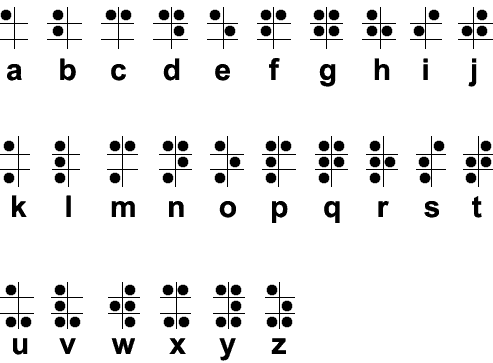
Braille came to my head as it is another way of communication. Braille isn't spoken it's felt and that can be very promising as another way to communicate words on the iWatch. The alphabet of Braille is within a grid of 3 x 3 which is a perfect size to fit on the iWatch screen. Maybe the user could use braille to communicate? Instead of feeling braille the user would swipe their finger to make the braille pattern on the 3x3 grid to spell out words. Could be an interesting avenue to test.


Braille Alphabet


Samsung's Unlock Pattern

To continue the pattern/grid theme, Samsung also incorporates a pattern grid in order for the user to unlock their smartphone. The grid is the same size as the braille alphabet; a 3x3 grid allows the user to make a number of complex patterns to ensure their device is safe from anyone trying to unlock their phone. If the grid was 2x2 the easier it would be for people the get into someone else's phone as the number of potential combinations dramatically drops. Another potential idea could write the words in the grid. Instead of following the braille alphabet the user could just write 'A' using the grid. The grid would be big enough to accommodate all letters. This will remove the process of learning braille.


Finger Writing

Many brands such as Snapchat and Facebook Messenger incorporate the ability for the users to communicate with their fingers. This idea was first to introduce by Snapchat where the user can take a picture and draw on top of it using their finger (example below). This idea of using your finger to draw and write is not only creative but efficient and practical for the majority of users. In terms of ease, this method would be the easiest to introduce. The user knows how to write with a pen or pencil so writing with their fingers would be an effortless transition. Applying this method onto the iWatches small screen will also be achievable. When we write on paper the words are already very small, around 12pt. The screen will be bigger enough for users to write naturally. The only downside is the user would only be able to write 1 or 2 letter at a time.


Whatever solution is selected we must ensure other options are also available for everyone. This ensures the app become access for all user with disabilities.

EP // BRIEF 6 // HUNGRY HOUSE // NON-SPEECH RESEARCH

The problem that I found when speaking to people who currently or used to own an iWatch is the fact that not many people like to talk directly to the watch, they find it embarrassing and feel slightly silly. This research blog post looks into other ways we could avoid users speaking into the iWatch. By investigating other technology that is currently available and could be integrated within the iWatch.

Eye-tracking

Eye-tracking could be an effective replacement for speaking to the iWatch.  The user can still use the typical touch functions with their hands but by implementing eye-tracking software will undoubtedly open the iWatch up to many opportunities. First off, it's an effortless interaction between user and device. The natural way a normal watch is used is by naturally glancing at it to check the time, by using hands can be unnatural to some people who still want the traditional interactions with a normal watch. Eye tracking allows the iWatch to become accessible for people with motor impairments. This creates an accessible environment and ensures that users with disabilities are not left behind.  The most famous eye-tracking brand is Tobii. Tobii provides eye tracking for research purposes along with, assistive technologies, and gaming. Tobii is also available within gaming and VR headsets. Tobii is certainly an all-rounder in regards to what the eye-tracking software can be applied too. Currently, eye-tracking hasn't been used with any smartwatches so the potential for this to happen could be a possibility with the likes of Tobii who are already making huge progress to include their software into many different industries.


Muscle Movement


Controlling the iWatch with muscle movement could also be a great opportunity for many people. There is current a wearable tech on the market called 'Myo' which is controlled by gestures. "The Myo armband is a wearable gesture control and motion control device that lets you take control of your phone, computer, and so much more, touch-free." The video is below which gives you a demonstration of how the tech works. The way I see this piece of tech within the iWatch is the user being able to use hand gestures to control the watch, a different hand signal for different actions. Again, this opens up the watch to disability users who may be speech impaired. 


Tuesday, 11 April 2017

EP // BRIEF 3 // D&AD PEARSON // EVALUATION

The work that I've created for this brief has been the best piece of work I've created out of all the three years I've been at LCA. The concept and the final submission I felt have been extremely strong. Similar to 'Related' I can see this concept being developed into a fully functional chatbot. I believe in e-mily and can absolutely say with certainty that the concept could be an answer to the future of education, bringing education to billions of students around the globe. If this idea hasn't been produced by another company within 5 years I will myself...somehow.

It seems that the work I produce from live briefs, especially D&AD is always my best work. I think it's down to the type of briefs and the presentation of the final resolution. D&AD is where I first learned animation and video production, so even though you have to pay £200 to buy a pencil, they made me push myself and teach myself a number of valuable skills. I loved the whole experience and wouldn't change anything. The only thing I would change is the amount of work. Time was restricted and I couldn't produce everything I wanted too but the final video explains the e-mily in a precise and efficient format. Due to the restricted time I had on the brief, I felt this in some respects it made me work more productively. There was a number of late nights but I proved to myself that I could produce a significant amount of work within a short period. Work that was also of a very high standard. The concept of e-mily was influenced by the talk at NUX5 by Graham Odds. It's the first time I've experience real influence and acted on it. I was extremely inspired by the talk, which the brief allowed me to add my own spin and vision on what Graham was discussing.

Like last year I already had to use the recording booth to record a voice over for the video. This allowed me to extend on a few skills around voice production. The brief forced me to come out of my comfort zone, to discover and learn topics that I hadn't been familiar with before. The whole brief had elements such as animation, video production, sound production and the majority of Creative Cloud to create the final resolution. I had to come out of my comfort zone but the results make it all worth it.

EP // BRIEF 3 // D&AD PEARSON // THREE ANIMATED E-MILY SCENARIOS

I've previously discussed the three scenarios in other blog posts (Storyboard post) but this blog post are the scenarios in context. These will be put into the final video for submission. They allow the judges to get a feel out how e-mily would actually work in context. It allows me to present my vision and to really show off what e-mily can achieve with any social messaging platforms.

Maths Homework (1st video)

First off the user gets a notification from another student within Facebook Messenger. The student asks if the user has the Maths homework that needs to be completed by next week. The user replies suggesting that they will check. The user then begins to type out a call out function. Call out functions acts as a trigger to indicate to e-mily that she is being called. The call out functions consists of two '//' which the user writes.

The user types '// homework' and in return e-mily brings up a number of categories relating to the keyword. The user taps Maths homework and the user is shown the homework in more detail. The user can then send the homework after clarifying whether they want to send the original homework or send the revised version. Once the user has chosen, the homework gets sent across to the other student. The student can then decide if they want to download the homework straight from Facebook messenger or if themselves have e-mily they can also add the homework to their homework tasks within their own e-mily application.


Completing homework within Messenger

e-mily pops within Facebook messenger indicating that the user has a daily revision question. The question is what is 741 ÷ 3. Along with the question Emily also provides the user with the opportunity to solve the question within Facebook Messenger. If the user wishes to solve the question within the platform the user can use the 'fingerpad' feature by tapping underneath the question as shown in the video. Once the fingerpad is activated the user is given a UI where there is a box for workings out and a box to submit the answer.

Once the answer has been submitted e-mily automatically logs the answer within the user's revision task, the revision tasks can be visited through any messenger app or can be accessed by visiting the app.


Group Collaboration 

The user is within a group chat within Facebook messenger and both students need access to the calendar to find out what time their group needs to be in tomorrow for the presentation. As the students are not sure how to access the calendar from the university's website, the student then asks the user whether they can find out what time they have to be in for the presentation.

The user then types the call out function and types the keyword 'calendar'. e-mily then provides the user with a number of options relating to the keyword. User then touches 'calendar' and up pops the calendar. The user then taps on the day of the presentation which is the 22nd. e-mily then brings up that day in more detail, showing the schedule for the entire day. Once the user is happy they can then send the schedule for that day across to the group chat. Once sent the other students can then download the day's schedule or again if they have e-mily installed they can also add that day to their own e-mily application.


EP // BRIEF 3 // D&AD PEARSON // ACCESSING E-MILY WITH THE APP

The majority of the users will use e-mily within message apps. But when users download e-mily they first have to register with the app. Once registered, the student will be able to find their university, College or school and once there they are confirmed as a student the student's course data and resources will instantly be sync with all messaging apps. A basic walkthrough of the app below:


The startup screen for when the user firsts visit the app.


The student is then given a choice of two. Choose their educational institute or continue without. In opting to continue without an educational institute the user can still use the app but they won't be ab;e to access any resources or data from their Uni, College of school, instead, everything will have to entered manually.


The student chooses the first option (choose institute). The student can then search for their institute.


After this step e-mily then asks for the student's number and other verification to ensure the student is, in fact, a student. Once confirmed the student will be able to upload homework also set tasks and reminders among many other things. Students can also proceed into the settings to confirm which messaging apps they want e-mily to show up. Once this is all complete students can see all their course resources, data and even complete their homework all within any social messaging app.


EP // BRIEF 3 // D&AD PEARSON // SCRIPT & VOICEOVER

Below is the script used within the final video submission for e-mily. Last year I entered The Telegraph brief for D&AD and within that video, Lois produced the voice over. Looking back, I don't regret using Lois for the voice over but I think it wasn't the best approach in regards to the actual voice. Lois is northern and sometimes the northern accent could be hard to understand. Looking back at previous they all used a southern voice. A voiceover within a video is such an important element which shouldn't be overlooked. When we gathered feedback we were told that we should have used a southern voice that's plain and easy to understand as the judges would appreciate it more and it comes across as more professional. Therefore, for this year's submission, I made sure I got a southern voice, and that voice belongs to Cameron. Cameron,  a posh boy from south London was perfect for the video.

The script discusses the concept in its most precise form. Allowing the judges to understand the concept within the first few seconds of the video starting. Capturing their attention, setting the tone and stating the who, what, when, where and why all within 2 minutes.


Script is below:

"e-mily is a convenient chatbot with the purpose of delivering instant education to billions of students across the globe, through the familiar setting of messenger apps. As a fully interactive chatbot, e-mily is motivational and compassionate, with a friendly personality. e-mily is also capable of recognising speech patterns, in order to create a personal experience for each student.

e-mily abolishes the outdated nature of education and instead delivers a modern learning tool directly into the students’ most familiar and comfortable environments. Educational institutes have the option to pay a fee to register with e-mily, instantly syncing all course data and resources with the application. Embedding e-mily within the existing social messaging platforms provides the user with a service that is already credible, trustworthy and cost effective.

From the examples shown, students can use a number of callout functions to quickly access e-mily’s resources related to their study, to either collaborate and share with friends or to be used directly with e-mily. Students can access their timetable, calendar, library resources, set tasks and even complete their homework with help from e-mily.

Right now, 60% of the world's population owns a smartphone with over 2.5 billion people having at least one messaging app installed. With WhatsApp users averaging nearly 200 minutes each week, messenger apps are the future. e-mily will be accessible on all digital devices opening up the services to a wide range of students.

At this moment in time, many people view the world as a place of turmoil and suffering, due to poverty, corruption and other social issues. As Nelson Mandela once said, “Education is the most powerful weapon which you can use to change the world. e-mily is that very weapon of education, a weapon only used to create a brighter future and a brighter path for all."

EP // BRIEF 3 // D&AD PEARSON // USER JOURNEY

As a concept and process e-mily is huge. Therefore, I cannot document and design every scenario the user may take. To save time I decided to concentrate on three different scenarios. Each scenario represents the concept as a whole as they all included different ways the students would interact with e-mily. The three main scenarios are group collaborations and 1-1 with e-mily.

Storyboards help to understand the user journey. Mapping out the number of interactions and reconise the steps the user would take to get from point A - B. Storyboards are below:


EP // BRIEF 3 // D&AD PEARSON // FINAL VIDEO

Below my submission for D&AD Pearson brief.


EP // BRIEF 3 // D&AD PEARSON // LOGO, COLOUR & STYLE

Logo

For the logo, I wanted something personal, friendly and motivational. Once a name is found it will be attached to the chatbot which interacts with billions of students around the globe within social messaging apps. The name had to be easy pronounced to give a humanistic portrayal towards the chatbot. This sparked the idea to give the chatbot a human name so when the user sees the chatbot within Whatsapp or Facebook messenger the user would subconsciously see the chatbot as a human-like friend and not just a robot. The problem I ran into was what name to use and would a human name become confusing. For example, we used the name "Hannah" and Hannah the chatbot popped up within Whatsapp, the user may be confused who Hannah was. Are they a real person or are they a chatbot, it's not something that will be immediately obvious. Therefore, I had to find another way use a human-like name but without the user being confused. 

I then come up with the name "e-mily". Without the '-' we get Emily, a human name. It's easily pronounced which is beneficial for students across the world to say. Emily sounds very friendly and safe. By adding the '-' we combine two elements, the human name, and e-learning. e-learning simply refers to learning online, which is what the concept is attempting to achieve. In the end the user will see 'e-mily' pop up on any social messaging platform and feel connected to the humanist name but will be able to instantly understand that it's, in fact, a robot because of the '-' next to the 'e'. I hope this makes sense. The logo for e-mily is below.


Colour

For the majority of the time, the user will only be interacting with e-mily through messaging apps. e-mily will be seen within its own application and within the UI of all messaging platforms. When e-mily is visible it will be seen with the color green. Why the colour green? Green is the colour of learning, It symbolizes growth, harmony, freshness, and has a strong emotional correspondence with safety. All attributes and characteristic that represents a familiar and comfortable learning environment. I tried other colours such as blue and red but I found that blue was too similar to Facebook's blue and I didn't want e-mily to seem like it was associated with any messaging platform. Red seems too harsh, especially when it's considered a colour of danger. It doesn't represent a friendly environment. Below you can see the colours in context.
How the red looked


Style

The style I wanted to portray is of a modern and minimal aesthetic. The majority of learning environments are very outdated and uninspiring. Therefore, a modern style and appearance will encourage a motivational environment where the user feels connected and joyful. The style also needs to match the overall modernistic look for the majority of messenger apps. For example, the UI of Facebook messenger is very slick and modern and if you have an outdated chatbot integrating within Facebook messenger the whole looks will clash and will be off-putting for the users. Making not only e-mily but also messaging apps look unprofessional, discredit their choices.

Monday, 10 April 2017

EP // BRIEF 3 // D&AD PEARSON // WHAT I LEARNT FROM LAST YEAR

Lasy year I entered D&AD with my BBC Crimewatch entry. I personally thought it was a very strong concept but thinking back I don't think I executed it very well. The fact that I produced a video for my idea was great and the right choice for presenting and showing off the concept but it was what the video was about. I tried to be clever and produce an acted scene where the judges would be able to see the concept in context. Looking back, this approach wasn't as effective as I first thought. The video was hard to understand and the concept was blurred by the dramatic acting, story line and the restricted time limit. On the brief, It stated that the concept needed to be understood within 10-20 seconds. However, the Crimewatch concept wasn't actually revealed until the last 10 seconds...

After D&AD released the results I looked at each winning entry to see what they did and how they presented their video. They were all very well structured, outlining the problem, the solution and how they solved it. It was clearly miles better. They didn't go into too much detailed or try to explain every single detail. This year I'm going learn from my mistakes and apply what I had learned from last year's winners to this year and hopefully come away with a pencil.

EP // BRIEF 3 // D&AD PEARSON // POKEMON GO IDEA

Pokemon Go was absolutely massive last year with millions of people obessing over it. Pokemon Go is a game where you have to go outside to find and catch Pokemon. With your Pokemon, you can then battle other people from your town by visiting fictitious Pokemon Gyms.

Pokemon go is a great example of a concept where the user volunteers to venture outside to interact with their environment. This form of encouragement is a fantastic idea, how can we use this current framework and adapt it for education. To get children out of their living space and interact with their community of students. Below I've outlined what Pokemon Go can do in regards to the game. For examples, Pokemon allows its users to: 

  • Interact with their environment
  • Build friendships with other people from their community
  • Gets user out of their home
  • Rewards players for interacting with their environment
  • Gives user an incentive to not stay inside
So how can be adapt the game of Pokemon Go to apply it to education? We can begin to encourage the user to go outside to search for objects relating to a certain subject but in game form. Solving problems by interacting with their environment. For example, the user has to go outside and find a certain amount of objects and document them within the game to unlock a reward to either update or customise their character. Its got a taste of Pokmon Go but instead of catching and finding Pokemon the user can find and learn about their surroundings relating to different subject areas such as history, science and so on.


EP // BRIEF 3 // D&AD PEARSON // CHATBOT & MESSENGER APPS RESEARCH

Chatbots

Chatbots are the main focus of my idea. They will be at the forefront, dealing with students and allowing them access to a range of resources and data. So, what is a chatbot?  According to the Guardian, chatbots are:

"Chatbots are computer programs that mimic conversation with people using artificial intelligence. They can transform the way you interact with the internet from a series of self-initiated tasks to a quasi-conversation."

https://www.theguardian.com/technology/2016/apr/06/what-is-chat-bot-kik-bot-shop-messaging-platform


Last year, Facebook allowed access to their Facebook Messenger platform to third party chatbots. The platform current has more than 1 billion monthly users. With other messaging apps also opening their services to chatbots, chatbots have become a source of opportunity. Pulling in big financial gain within messaging platforms. Alongside financial gain, chatbots are also beneficial for the overall user experience. They can handle adapt to the language spoken to them by users and can process many requests at once. Facebok also announced last year that since they've opened their messaging platforms to third party chatbots 30,000 bots have been created in the less than six months. Chatbots can help its users in many extraordinary ways. Chatbots can:


  • Be your lawyer - A chatbot called 'DoNotPay' was created by Joshua Browder. The chatbot has reportedly turned over 160,00 parking tickets in London and New york.
  • Order your food - A chatbot can order food for you. All you need to do is speak to the bot or type out your order. It has gone down so well that Taco Bells has created their own 'Tacobot' which lets you also order food.
  • Be your doctor - Chatbot that can give you advice, recommend treatments and give you access to a range of medical resources. Saving money and time.
  • Be your pension or finance adviser - RBS has recently created a chatbot called 'Luvo'. Luvo can help its customers with common issues such as lost debit cards, locked PINs or provide help to order new cards.

As you can see above these example of chatbots don't necessarily have to be used within social messaging platforms but the benefits, power, and practicality they have are unmistakable.

Social Messaging 

60% of the world's population owns a smartphone with over 2.5 billion people having at least one messaging app installed. With WhatsApp users averaging nearly 200 minutes each week, messenger apps are clearly the future for communication. According to a recent study in 2014 two-thirds of smartphone users don't download apps. People often stick to what they're used too.


Social Messaging allows billions of people to have a connected conversation all around the globe. People are more connected now than ever and with smartphone becoming accessible to poorer families many more people have access to social messaging. Collectively messaging apps have around 5 billions active monthly users, from Facebook messenger, Kik, Viber, Whatsapp, Skype, Snapchat, WeChat, plus much more. People now spend more time in Social Messaging than in Social Media and this is especially true for the millennials. This is evident by the recent study by the Business Insider. The graph below shows the rise of the biggest 4 Messaging apps overtaking the biggest 4 social networking apps. With the big 4 social messaging apps pulling in nearly 3 billions active monthly users. 


No doubt the power of both Chatbots and Social Messaging. Even before starting the brief we can see by implementing education within both of these platforms will instantly be available to billions of students. Already making a global impact on many students.